

Hosting: Jira Cloud
You have one export link per calendar, and it comes in four forms: two ICS feeds, a page to embed and JSON.
The Export dialog
Open the "..." menu of the calendar and choose "Export". The first time "Export URL" is empty: click the refresh icon to create the link, then the copy icon.
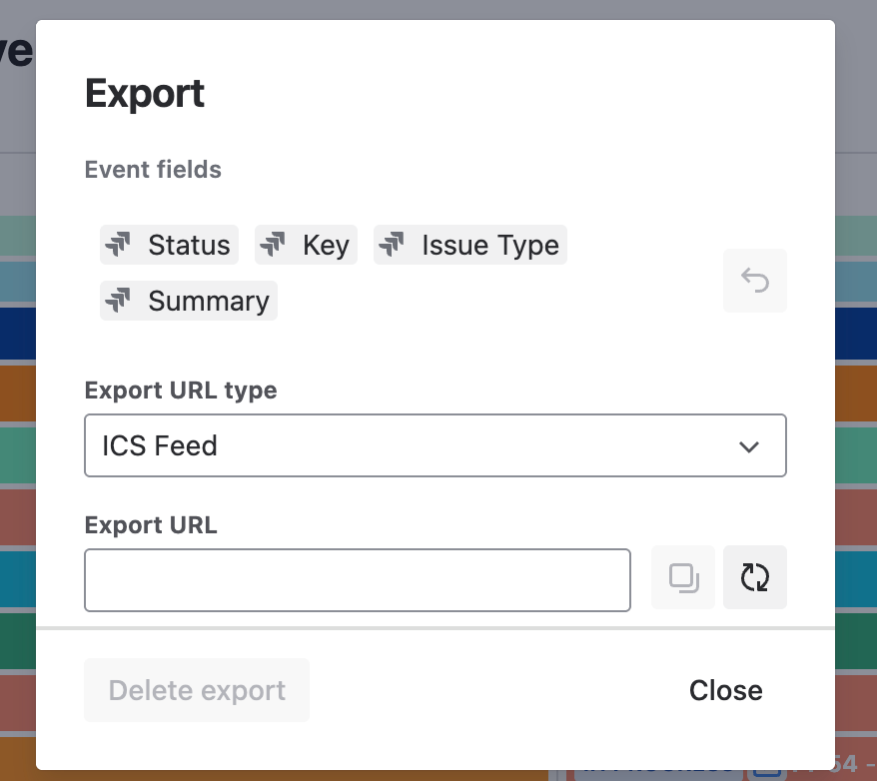
"Export URL type" has four choices:
-
"ICS Feed": Google Calendar, Outlook or another calendar client subscribes to it.
-
"ICS Feed (Team Calendar)": the same feed where every event has an end date, for Team Calendars in Confluence.
-
"Embed URL": a read-only page for an iframe.
-
"JSON": the events as data for a script.
"Event fields" sets which issue fields form the event title in the export, up to 10. It starts with the "Event fields" of the calendar, and the undo icon returns to them.
The refresh icon replaces the link, so the old one stops working in all four forms. "Delete export" removes it.
What the link shows
Anyone who has the link sees the calendar without logging in to Jira, with your permissions: issues, user events, versions and sprints, from one month before today to three months after. The ICS feed asks calendar clients to refresh every 30 minutes.
Parameters
The link ends with /e/{site key}/{calendar id}.ics?secret={secret}, with .html for Embed and .json for JSON. Add parameters with &.
|
Format |
Parameter |
Values |
|---|---|---|
|
ICS |
|
|
|
ICS |
|
|
|
Embed |
|
|
|
Embed, JSON |
|
such as |
|
JSON |
|
dates such as |
The Embed link from the dialog already carries your time zone and language, and JSON without them uses your Jira profile.
When a link stops working
The link answers "not found" when:
-
the Jira admin switched off "Enable ICS export" or "Enable Embed and JSON export" on the admin page "Export";
-
a calendar admin checked "Disable export for this calendar" on the "Permissions" tab, which deletes every link of that calendar;
-
the request comes from an address outside the "IP allowlist";
-
you lost the global permission "DoItBetter Calendar Exporters" or your access to the calendar;
-
the Jira admin clicked "Deactivate" on the tab "Active exports".
"Exclude projects from exports" does not stop a link, it leaves the issues and versions of those projects out. After 1000 requests per hour from one IP address, or 10000 per hour for one calendar, the link answers "too many requests".